
MERN Stack Project Ideas for Beginners 2026: Build Real-World Full-Stack Apps
In the fast-paced world of web development, finding practical MERN stack project ideas can kickstart your journey into building full-stack applications. The MERN stack, which stands for MongoDB, Express.js, React.js, and Node.js, offers a powerful way to create dynamic websites and apps using JavaScript throughout. If you're a beginner looking for MERN stack project ideas in 2026, this guide will help you explore real-world projects that build your skills step by step. These ideas focus on creating functional apps that solve everyday problems, from managing tasks to connecting with others online.
Whether you're new to coding or have some experience, these MERN stack project ideas are designed to teach you core concepts like database management, API creation, front-end rendering, and server-side logic. By working on them, you'll gain hands-on experience with modern tools and best practices that are in demand in 2026. Let's dive into what makes MERN so popular and then explore a variety of project ideas to get you started.
What is the MERN Stack?
The MERN stack is a collection of technologies that work together to build web applications from front to back. MongoDB handles the database, storing data in a flexible, JSON-like format. Express.js is a framework for Node.js that simplifies building server-side APIs. React.js takes care of the user interface, making it interactive and responsive. Node.js runs the server-side code, allowing JavaScript to be used everywhere.
This stack is popular because it uses one language, JavaScript, which makes it easier for beginners to learn. In 2026, with updates like React 19 and Node.js 22, MERN remains a top choice for scalable apps. It powers everything from small tools to large platforms, and its community support is huge.

Why Build MERN Stack Projects in 2026?
In 2026, the demand for full-stack developers is higher than ever, thanks to the rise of AI-integrated apps and remote work tools. MERN stack project ideas help you practice real skills that employers look for, like handling user authentication, data persistence, and responsive design. Building projects also boosts your portfolio, showing you can create end-to-end solutions.
These projects teach you to integrate third-party APIs, manage state with Redux, and deploy apps to platforms like Vercel or Heroku. Plus, with MERN's focus on performance, your apps will load fast and handle users efficiently. Starting with simple MERN stack project ideas builds confidence before tackling complex ones.
Setting Up Your MERN Development Environment
Before jumping into MERN stack project ideas, set up your tools. Install Node.js from the official site, which includes npm for package management. Create a new project folder and initialize it. Install Express, Mongoose for MongoDB, jsonwebtoken, bcryptjs, and create a React app for the frontend.
Connect your backend to MongoDB Atlas for cloud storage. Use tools like Postman to test APIs and VS Code as your editor. This setup takes about 30 minutes and prepares you for any project.
Adding User Authentication to Your MERN Projects
Most real-world MERN stack project ideas need user accounts. Authentication lets users sign up, log in, and access private features safely. We'll use JWT (JSON Web Tokens) for stateless auth and bcrypt to hash passwords securely.
Why Add Authentication?
- Protect user data (tasks, posts, orders)
- Enable personalized experiences
- Build secure, production-ready apps
- A must-have skill for 2026 job applications
Install these packages in your backend:
npm install jsonwebtoken bcryptjsStore your JWT secret in .env: JWT_SECRET=your_long_random_secret_here
Backend: User Model with Bcrypt
models/User.js
const mongoose = require('mongoose');
const bcrypt = require('bcryptjs');

const userSchema = new mongoose.Schema({
  username: { type: String, required: true, unique: true },
  email: { type: String, required: true, unique: true },
  password: { type: String, required: true },
  createdAt: { type: Date, default: Date.now }
});

// Hash password before saving
userSchema.pre('save', async function(next) {
  if (!this.isModified('password')) return next();
  const salt = await bcrypt.genSalt(10);
  this.password = await bcrypt.hash(this.password, salt);
  next();
});

// Compare password method
userSchema.methods.comparePassword = async function(candidatePassword) {
  return bcrypt.compare(candidatePassword, this.password);
};

module.exports = mongoose.model('User', userSchema);
Backend: Register Route
routes/auth.js (excerpt)
const express = require('express');
const router = express.Router();
const jwt = require('jsonwebtoken');
const User = require('../models/User');

router.post('/register', async (req, res) => {
  const { username, email, password } = req.body;
  try {
    let user = await User.findOne({ email });
    if (user) return res.status(400).json({ msg: 'User already exists' });

    user = new User({ username, email, password });
    await user.save();

    const payload = { id: user.id };
    const token = jwt.sign(payload, process.env.JWT_SECRET, { expiresIn: '1h' });

    res.json({ token });
  } catch (err) {
    res.status(500).json({ msg: 'Server error' });
  }
});
Backend: Login Route
router.post('/login', async (req, res) => {
  const { email, password } = req.body;
  try {
    const user = await User.findOne({ email });
    if (!user) return res.status(400).json({ msg: 'Invalid credentials' });

    const isMatch = await user.comparePassword(password);
    if (!isMatch) return res.status(400).json({ msg: 'Invalid credentials' });

    const payload = { id: user.id };
    const token = jwt.sign(payload, process.env.JWT_SECRET, { expiresIn: '1h' });

    res.json({ token });
  } catch (err) {
    res.status(500).json({ msg: 'Server error' });
  }
});
Backend: Protected Route Middleware
middleware/auth.js
const jwt = require('jsonwebtoken');

module.exports = function(req, res, next) {
  const token = req.header('x-auth-token');
  if (!token) return res.status(401).json({ msg: 'No token, authorization denied' });

  try {
    const decoded = jwt.verify(token, process.env.JWT_SECRET);
    req.user = decoded;
    next();
  } catch (err) {
    res.status(401).json({ msg: 'Token is not valid' });
  }
};
Use it like:
router.get('/private', auth, (req, res) => {
  res.json({ msg: 'This is protected data for user ' + req.user.id });
});
Frontend: Login & Register Forms
src/components/Login.jsx (example)
import React, { useState } from 'react';
import axios from 'axios';

const Login = () => {
  const [email, setEmail] = useState('');
  const [password, setPassword] = useState('');
  const [msg, setMsg] = useState('');

  const handleSubmit = async (e) => {
    e.preventDefault();
    try {
      const res = await axios.post('/api/auth/login', { email, password });
      localStorage.setItem('token', res.data.token);
      setMsg('Logged in!');
      // Redirect or update state
    } catch (err) {
      setMsg('Login failed');
    }
  };

  return (
    <form onSubmit={handleSubmit}>
      <input type="email" value={email} onChange={e => setEmail(e.target.value)} placeholder="Email" required />
      <input type="password" value={password} onChange={e => setPassword(e.target.value)} placeholder="Password" required />
      <button type="submit">Login</button>
      <p>{msg}</p>
    </form>
  );
};
Do the same for Register. Use localStorage for the token (or HttpOnly cookies for better security in production).
Frontend: Using the Token (Axios Interceptor)
// src/axios.js or in App.js
axios.interceptors.request.use(config => {
  const token = localStorage.getItem('token');
  if (token) {
    config.headers['x-auth-token'] = token;
  }
  return config;
});
Now your protected API calls will send the token automatically.
Beginner-Friendly MERN Stack Project Ideas
Here MERN stack project ideas for beginners, each with code snippets—including auth integration where it fits naturally.
1. Simple To-Do List Application
A to-do list app is one of the best MERN stack project ideas for beginners. It lets users add, edit, delete, and mark tasks as complete. This project teaches CRUD operations (Create, Read, Update, Delete) and basic user interfaces.
Start with the backend: Set up Express routes for tasks, using Mongoose schemas for data models. For example, a task schema might include fields like title, description, and status. Connect to MongoDB to store tasks.
On the front end, use React to create a form for adding tasks and a list to display them. Use Axios to fetch data from the API. Add features like sorting by priority or due date.
Challenges include handling state changes when tasks update. Extend it by adding user accounts with JWT authentication. This project can be completed in a weekend and serves as a foundation for more complex apps.

Image credit: https://github.com/rashidmajeed/fullstack-todos
In code terms, your backend might look like this:
const express = require('express');
const app = express();
const mongoose = require('mongoose');

mongoose.connect('mongodb://localhost/todoDB');

const taskSchema = new mongoose.Schema({
  title: String,
  completed: Boolean
});

const Task = mongoose.model('Task', taskSchema);

app.get('/tasks', async (req, res) => {
  const tasks = await Task.find();
  res.json(tasks);
});

// More routes...
This simple structure helps you understand data flow.
2. Personal Blog Platform
Build a blog where users can write, publish, and comment on posts. This MERN stack project idea introduces content management and user interactions.
Backend: Create models for posts and comments. Use Express to handle routes for creating posts and adding comments. Integrate Multer for image uploads in posts.
Front end: React components for post lists, editors, and comment sections. Use React Router for navigation between home, post details, and admin pages.
Add search functionality to find posts by keywords. For SEO, ensure URLs are friendly, like /posts/slug.
This project teaches you about relational data, as comments link to posts. Potential extensions include categories, tags, and email notifications for new comments.
Protect post creation/editing:
router.post('/', auth, async (req, res) => {
  const post = new Post({ ...req.body, author: req.user.id });
  await post.save();
  res.json(post);
});
Add author field to Post model.
Frontend: Show "Write Post" button only if logged in.
3. Basic E-Commerce Store
An e-commerce site is a classic among MERN stack project ideas. Users can browse products, add to cart, and checkout (simulate payments).
Backend: Models for products, users, and orders. APIs for product listings, cart management, and order processing.
Front end: React pages for product grids, cart views, and checkout forms. Use Context API for global state like cart items.
Integrate Stripe for mock payments. Handle inventory updates when orders complete.
This project covers e-commerce basics like filtering products by category or price. In 2026, add AI recommendations for similar products to make it modern.
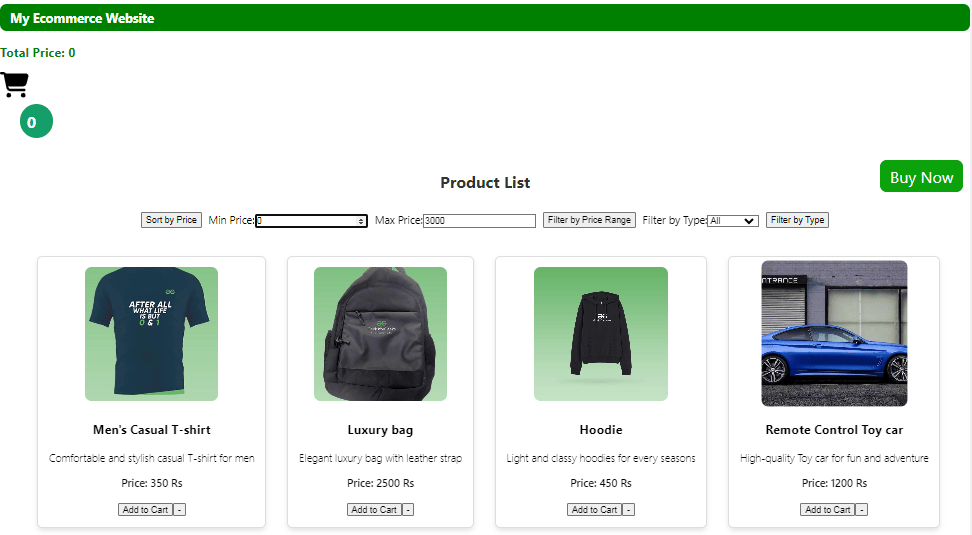
Image credit: https://www.geeksforgeeks.org/mern/e-commerce-website-using-mern-stack/
4. Social Media Feed Clone
Create a simple social feed like Twitter or Instagram. Users post updates, like, and follow others. This MERN stack project idea focuses on real-time features.
Backend: Use Socket.io for live updates. Models for users, posts, and likes.
Front end: React feed component that updates in real time. Infinite scrolling for loading more posts.
Add user profiles and follow systems. Challenges include optimizing queries for large feeds.
Extend with notifications or media uploads. This mimics popular apps, making it engaging.

Image credit: https://www.youtube.com/watch?v=y2Kxmvaew90
5. Real-Time Chat Messenger
A chat app allows users to send messages instantly. Among MERN stack project ideas, this one highlights WebSockets.
Backend: Express with Socket.io for real-time messaging. Store chat history in MongoDB.
Front end: React chat windows with input forms. Display messages as they arrive.
Add groups or private chats. Use encryption for security.
This project teaches event-driven programming. In 2026, integrate voice messages or bots.

Image credit: https://www.youtube.com/watch?v=DqaYkdZXN10
Quick Auth Ideas for other Projects
- Expense Tracker / Fitness Tracker: Associate records with user: req.user.id
- Recipe Sharing / Job Board: Require login to post or apply
- Quiz / Note Organizer: Save user progress per account
- Event Calendar / Bookstore: Let logged-in users RSVP or review
Add these auth patterns to any MERN stack project idea to make them more realistic and secure.
Tips for Success with MERN Stack Projects
Break projects into small tasks. Use Git for version control. Test APIs early (especially auth routes). Deploy to free hosts. Learn from errors and improve. Always hash passwords and use HTTPS in production.
Resources to Learn More About MERN
Check freeCodeCamp, MDN Web Docs, or YouTube channels like Traversy Media and Net Ninja (MERN Auth series). Join communities on Reddit or Discord for help.
Conclusion
These MERN stack project ideas for beginners in 2026 provide a solid path to mastering full-stack development—with authentication added, your apps become truly professional. With the code snippets for JWT registration, login, and protection, you can secure any project quickly. Start small, build consistently, and you'll create impressive, secure apps. Share your projects online to get feedback and open new opportunities. Happy coding!